
✨ Improvement
🌌 The Galactic Projects window
The window you open from the footer to follow Global Research and Gate Projects has had a full refit. It is now a proper office sized window with both projects as tabs in its header, each showing what is happening at a glance.
Global Research
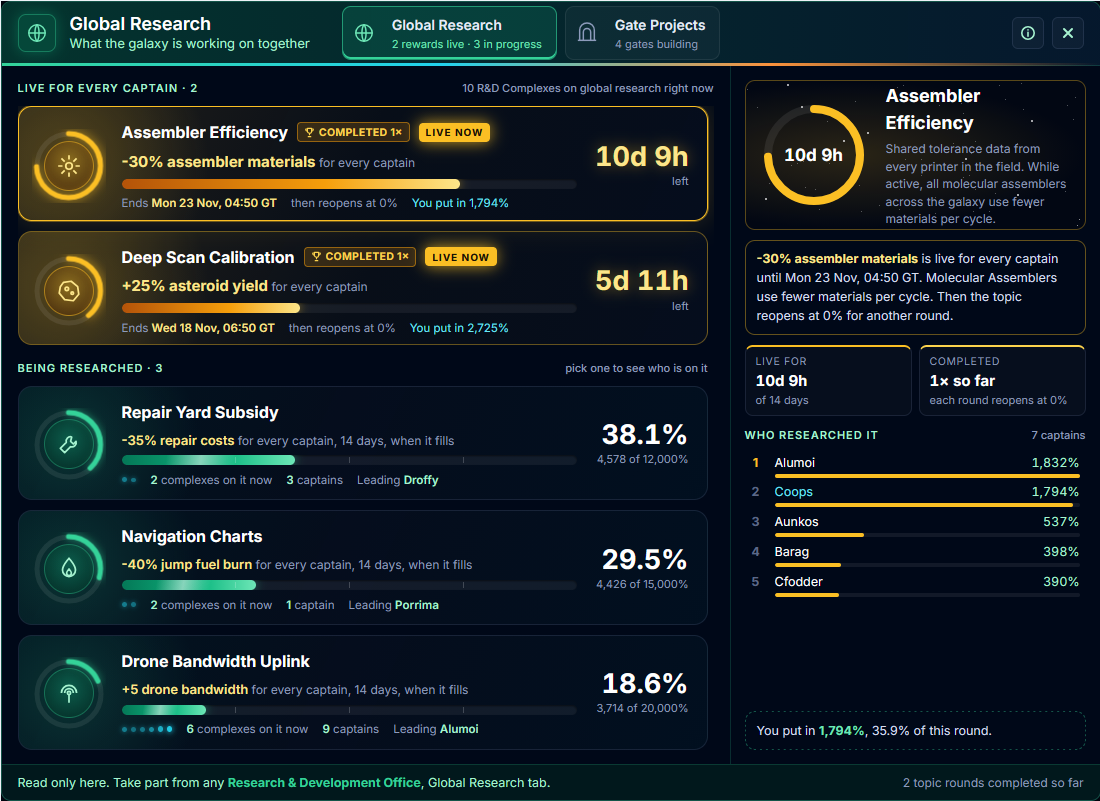
Every topic now sits in one list. Rewards that are live for every captain come first in gold, with the time they have left and the exact Galaxy Time they end. Topics still being researched show a ring of how full they are, how many captains have put work in, who is leading, and how many R&D Complexes are working on them right now, one glowing dot for each.
Pick any topic to see its leaderboard and your own share of the work. How global research works now sits behind the i button in the header.
Gate Projects
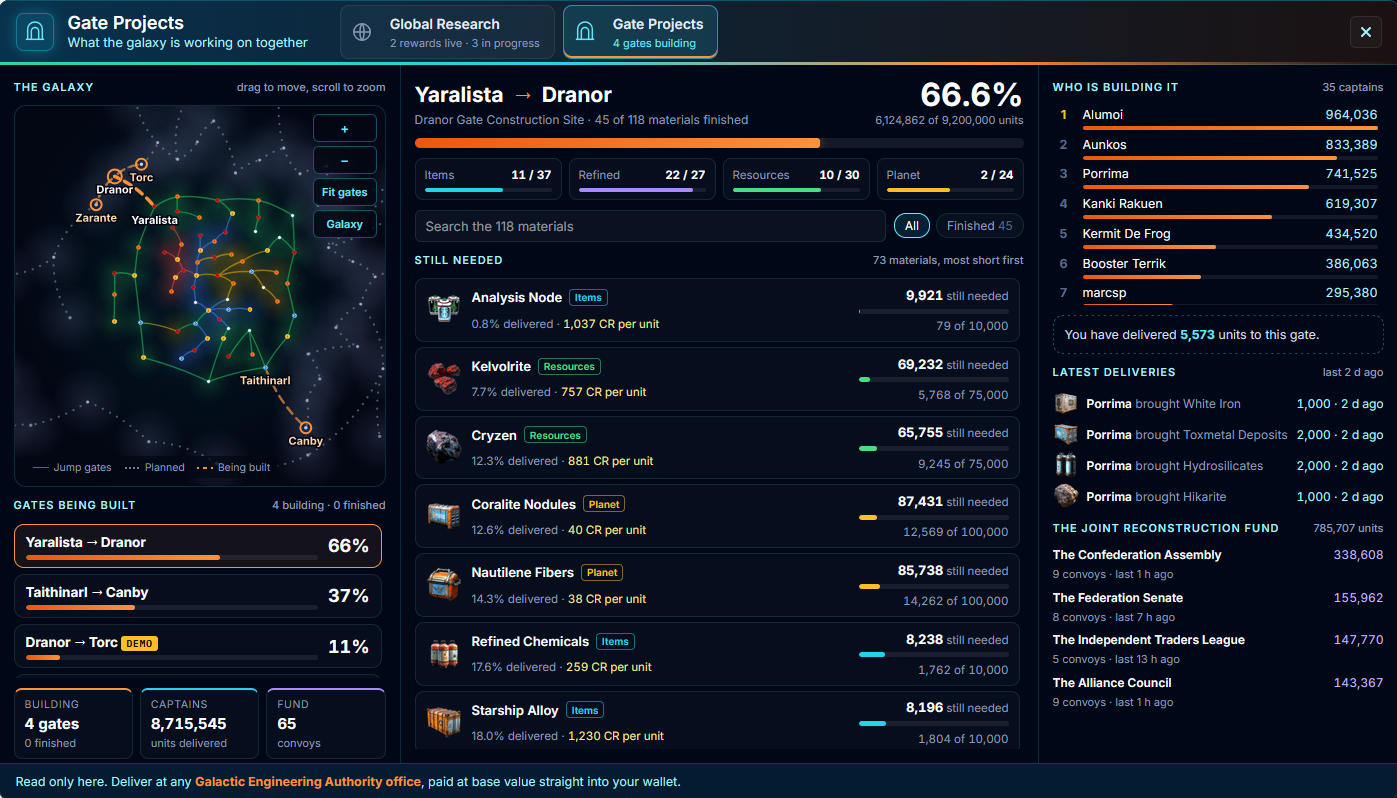
The tab opens on a map of the galaxy with every gate being built marked as a glowing orange corridor. Drag to move around, scroll to zoom, or use Fit gates and Galaxy to jump. Pick a gate in the list and the map flies to it.
Each gate now shows its full list of materials, the ones furthest from done first, with how much has been delivered and what each one pays per unit. You can filter by type, search, or look at just the finished ones. Beside it you will find every captain who has helped build it, your own deliveries, the latest drops and what the Joint Reconstruction Fund has sent from each government.
The window is still for following progress. You take part from any Research and Development Office, and deliver gate materials at any Galactic Engineering Authority office.
🔬 A new Research and Development Office
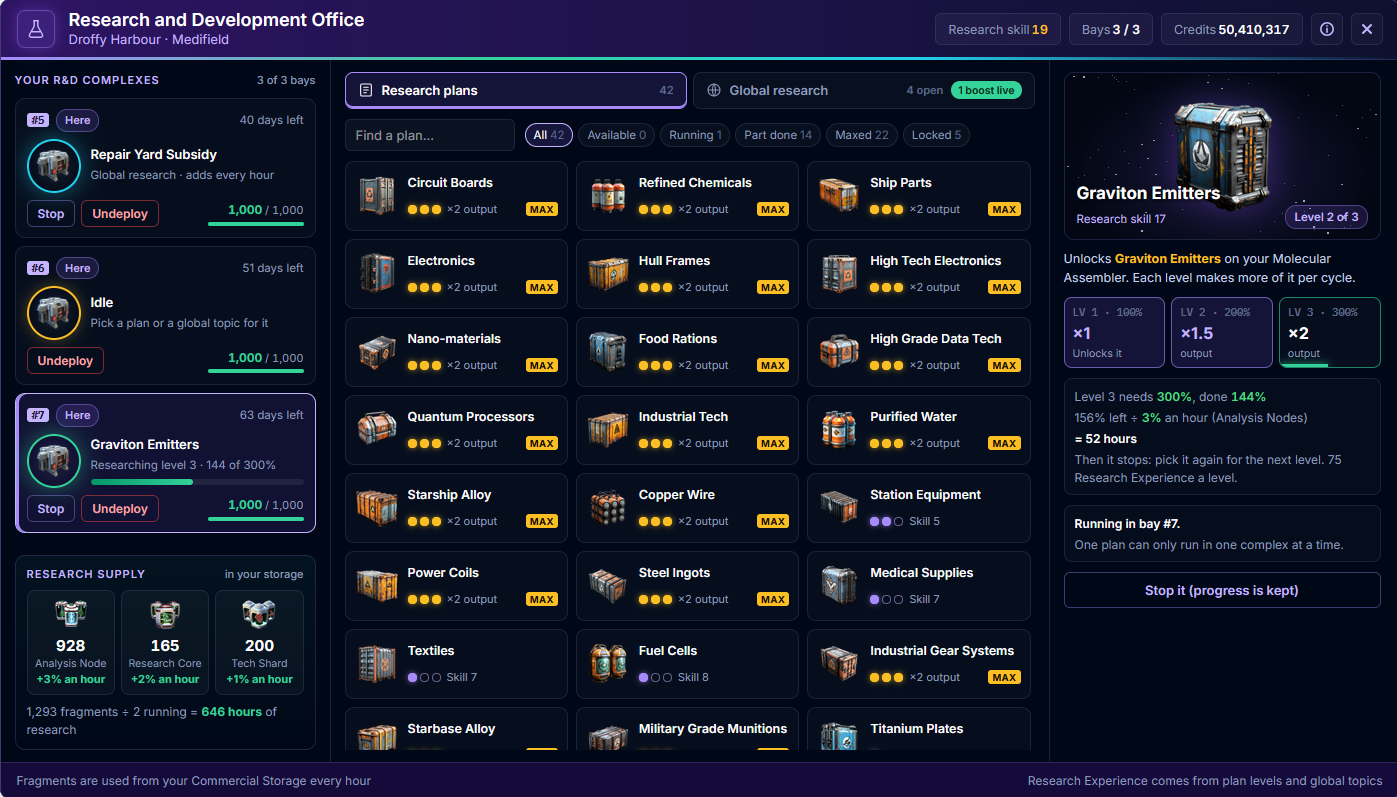
The Research and Development Office has had the same refit as the other offices. It opens full size from the Promenade and shows your whole research operation on one screen.
Your bays, wherever they are
Every bay you rent now shows here, whichever station it is at, with what its complex is working on, how many days of rent are left and its durability. A complex that has worn down to 0 is marked Needs repair. Below your bays you can see the research fragments in your Commercial Storage, what each adds an hour, and how many hours of research they will cover for the complexes you have running.
Plans and topics
All 42 research plans sit in one grid with their pictures and level pips, and you can filter them or search. Pick one to see its three levels, what each does for your Molecular Assembler, and how long the next level will take with the best fragment you hold. The Global Research topics have their own tab beside the plans.
From bay to research
Choose a plan straight from an idle bay and the office remembers which bay it is for, so you can press Start as soon as you pick the plan. Topics work the same way. Plans are started, stopped and undeployed at the bay’s own station, while global topics can be given a complex from any office. If the office can’t do something, it now tells you why.
Deploying a complex shows everything in your hold with the durability of each one, so you can pick the one in the best condition.
🛒 The equipment stores, refitted
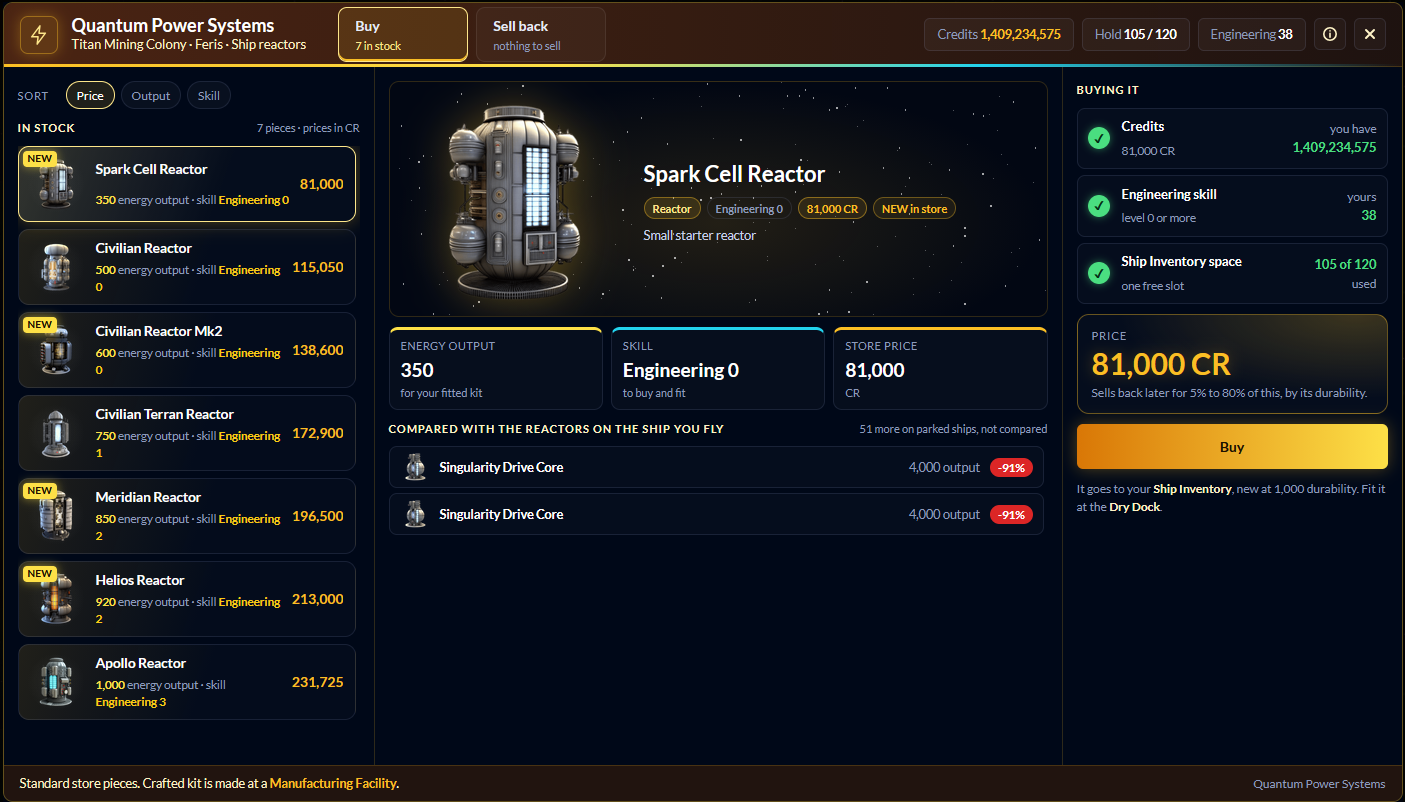
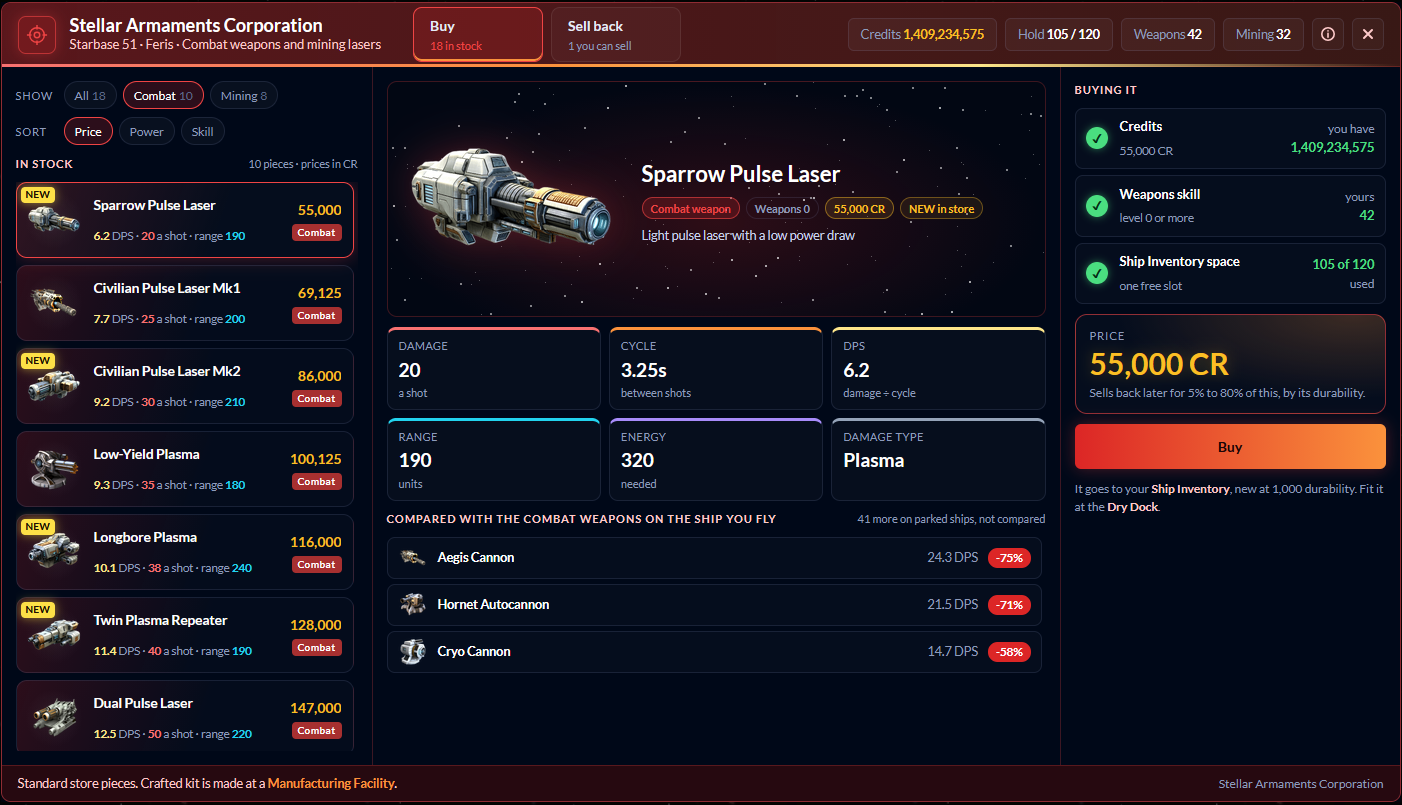
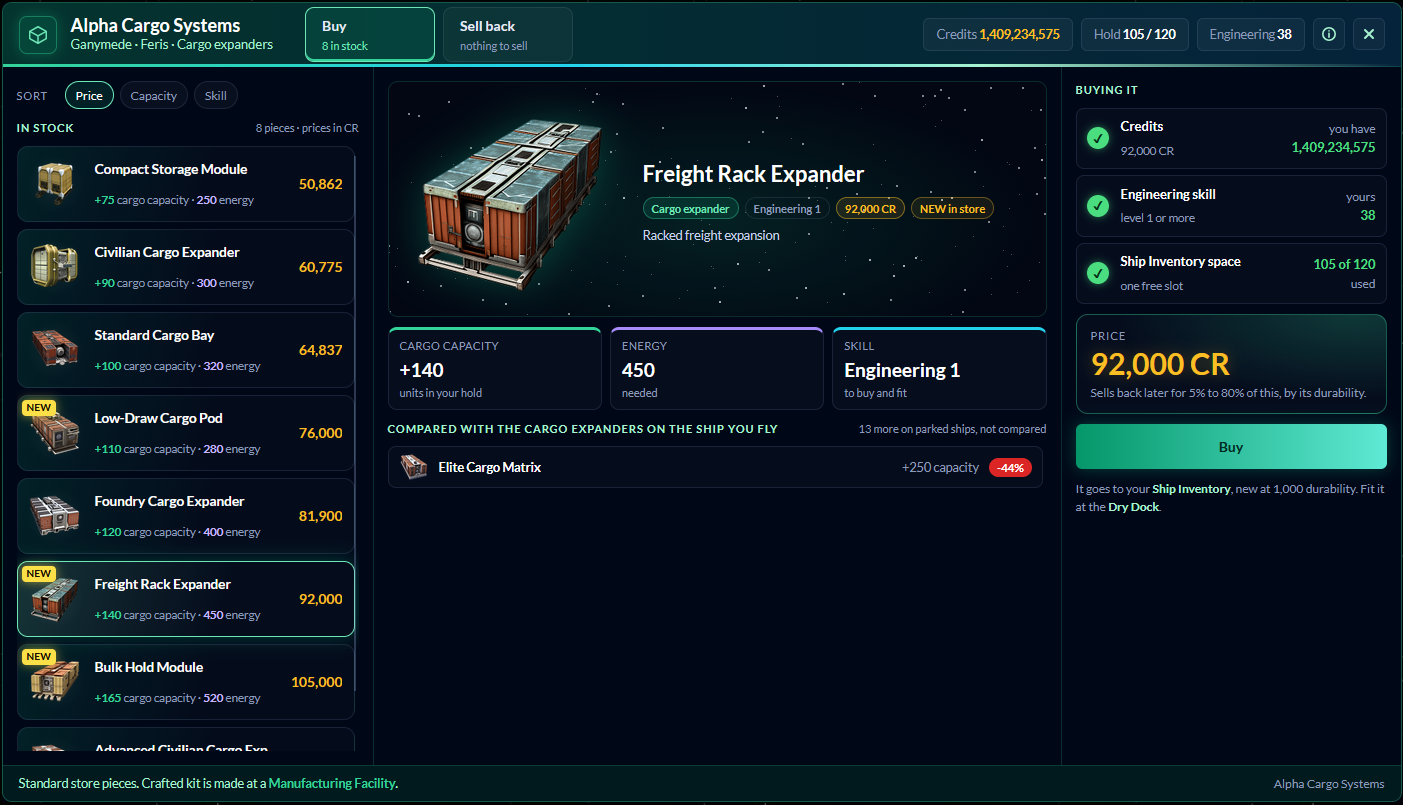
Stellar Armaments, Quantum Power Systems and Alpha Cargo Systems have all had a full refit. The three stores now share one layout so they feel like one family, and each company keeps its own colours: red for weapons, amber for reactors and green for cargo.
Buying
Buy and Sell back are now two big tabs in the header, next to your credits, your Ship Inventory space and the skill that matters in that store. The stock is a list of picture cards, each with its headline figure and price. The weapon store can show everything, just combat weapons or just mining lasers, and every store can sort by price, power or skill.
Pick a piece to see it up close with its real stats. Weapons show damage, the cycle between shots and DPS, which is simply damage divided by the cycle. Mining lasers show their power per cycle and per second, reactors their energy output and expanders their cargo capacity.
Below that, the piece is compared with the ones of the same kind on the ship you are flying, so you can see straight away whether it is an upgrade. Kit on your parked ships is counted separately and never mixed in.
Before you buy
A short checklist shows what the piece needs beside your own figures for credits, skill and Ship Inventory space. Each figure is green when you have enough and red when you do not, and a card tells you at a glance why you cannot buy it yet. Buying takes two clicks, and the second one names the price.
Selling back
Sell back lists only what that store will take, with each piece’s durability and what it pays. Pick one and the price is worked out in front of you: from 5% of the store price for a worn out piece up to 80% for one in perfect condition. Fitted and crafted pieces are listed separately with the reason they cannot be sold, so nobody goes hunting for them. Sales are one piece at a time, with two clicks, on purpose.
The seventeen pieces that arrived today wear a NEW badge for their first month on the shelves. Happy shopping, Captains!
🏗️ The Galactic Engineering Authority, refitted
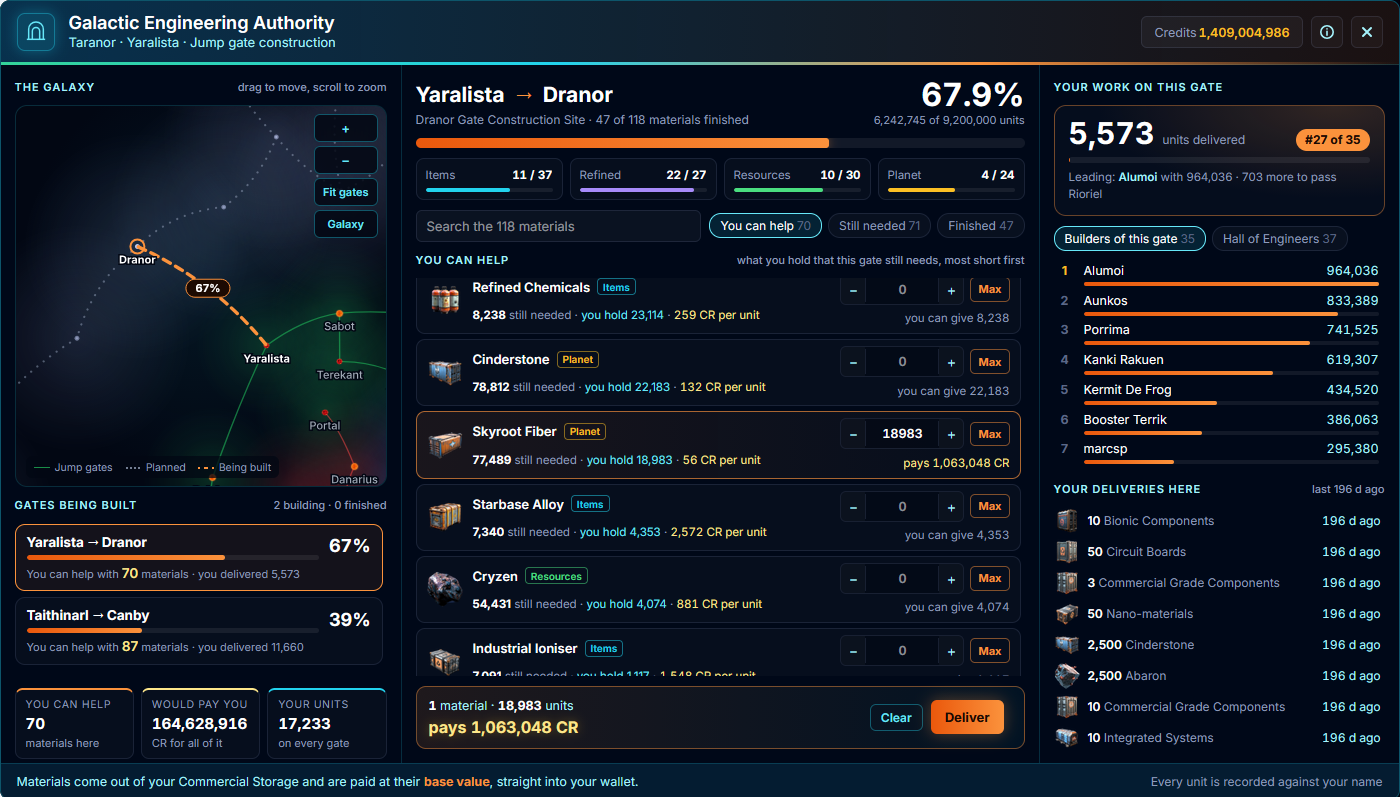
Every Galactic Engineering Authority office has had a full refit, built to make delivering gate materials quick and clear. It now shares the look of the Gate Projects window, with the same galaxy map and the same list of gates being built.
Delivering
Pick a gate and the office opens on what you can help with: everything in your Commercial Storage that the gate still needs, the ones furthest from done first. Each material has its own amount to set, with a Max button, and a bar along the bottom shows the total you are about to deliver and what it pays. Delivering takes two clicks, and the second one names the money.
Every delivery now comes with a receipt showing each material, how many you sent and what each paid, along with how far the gate moved and where you now stand among its builders.
Builders and the Hall of Engineers
Beside each gate you will find its builders, and a new Hall of Engineers that ranks every captain across every gate ever built. Your own deliveries are listed too, now showing what each one paid you.
Every delivery is recorded against your name, so if something ever looks wrong we can see exactly what was delivered and when. Happy building, Captains!
🏛️ Faction Standing, refitted
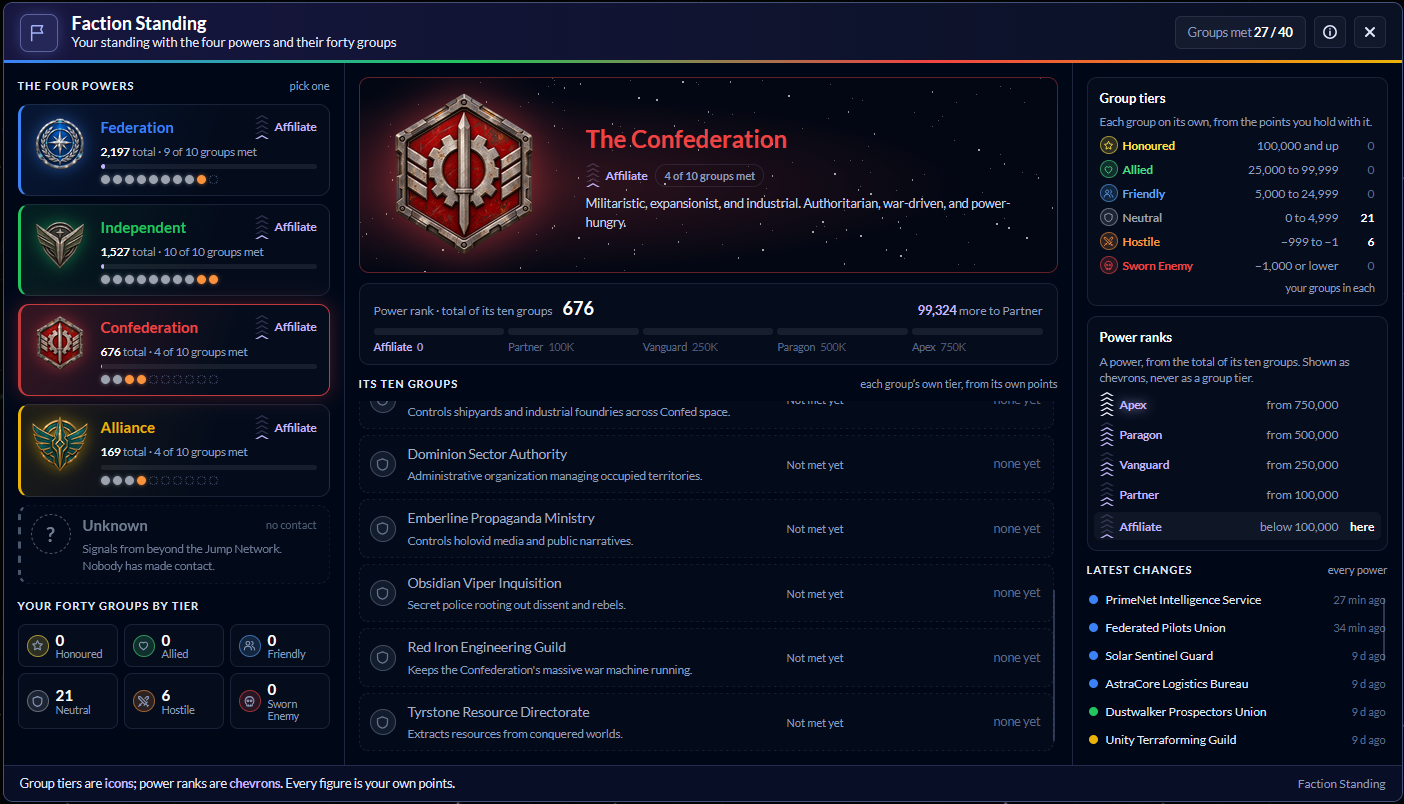
The Faction Standing window has had a full refit, with the four faction emblems and a much clearer way of showing where you stand. Thanks to Drylok and Orge Snorrsen for spotting that the old one did not add up.
Two scales, now told apart
Your standing is held with each of the forty groups, and each group has its own tier, from Sworn Enemy up to Honoured. Each of the four powers also has a rank, from Affiliate up to Apex, worked out from the total of its ten groups. The old window showed both under one legend with the same icons in different colours, which is why the colours and numbers never seemed to match.
Now a group tier is always a coloured icon and a power rank is always a set of violet chevrons, each with its own legend on the right, and the two never share a colour or an icon.
All ten groups
Pick a power to see all ten of its groups, including the ones you have not met yet, so the total finally makes sense. Every number is shown in full, with how far each group is from its next tier and when it last changed, and a list of your latest changes shows where your standing has been moving. The i button explains how standing grows.
A fifth power sits greyed out at the bottom of the list, marked Unknown. Nobody has made contact yet.
🏴☠️ Nowhere to hide
Pirates who ambush you, the contacts you chase down from your scanner and bounty marks with their crews now hunt you properly. They came looking for you, so they will follow you anywhere in the fight rather than drifting home when you back into a corner.
Thanks to Orge Snorrsen for spotting that the corners of the map had become a little too comfortable, and to Dirkish for confirming it. Pirate patrols in mining fields and around hideouts are unchanged, so flying away to shake off a patrol still works there.
⚖️ Balance Change
🔬 R&D Complexes now wear
Until now the durability on your R&D Complexes never moved. From this update, every hour a complex is working, on a plan or a global topic, it has an even chance of losing 1 point of durability. They wear slowly and a fresh complex will run for a very long time, but left alone they will eventually break.
When one reaches 0
A complex at 0 durability stops. It keeps its plan or topic and uses none of your research fragments while it is broken, and the Condition column shows Needs repair. Repair it at any Repair Office and it carries on by itself at the next hourly beat. A broken complex can’t be deployed or started until it has been repaired.
Clearer answers in the R&D Office
Deploying a complex, picking a plan or putting a complex on a global topic used to fail without a word when something was wrong. The office now tells you why, whether your Research skill is too low, the plan is already fully researched or the complex needs repair.
Picking a plan that can’t be started also no longer takes your complex off the global topic it was working on. It stays exactly where it was.
🌍 New Content
🛒 New stock at the equipment stores
Stellar Armaments, Quantum Power Systems and Alpha Cargo Systems have taken delivery of seventeen new pieces. They fill the gaps between the stock they already carried, so there are more steps on the way up for anyone upgrading at their own pace.
Weapons and mining lasers
Six new combat weapons join the rack: the Sparrow Pulse Laser, the Civilian Pulse Laser Mk2, the Longbore Plasma, the Twin Plasma Repeater, the Light Rail Driver and the Heavy Pulse Laser. Not every step is simply bigger. Some give up a little punch for a lighter power draw or a longer reach, so it is worth comparing before you buy.
Four new mining lasers sit between the Basic Mining Laser and the Miner Series 1: the Basic Mining Laser Mk2, the Prospector Beam, the Low-Draw Rock Cutter and the Seam Cutter.
Reactors and cargo
Quantum Power Systems now stocks the Spark Cell Reactor, the Civilian Reactor Mk2, the Meridian Reactor and the Helios Reactor. Alpha Cargo Systems adds the Low-Draw Cargo Pod, the Freight Rack Expander and the Bulk Hold Module.
A new name
The Founder Cargo Expander is now the Foundry Cargo Expander. It has always been a standard store piece rather than a tester reward, so the old name gave the wrong idea. Nothing else about it has changed, and every one already out there carries the new name.
🔧 Bug Fix
📈 Skill levels that keep up
Engineering you earn from repairing your ship or its equipment, or from station repair missions, and Social you earn from events on your travels, now raise your level the moment you earn it.
Until now those levels only caught up once you opened your Skills screen, so a store or the Dry Dock could turn you away for a level you had already reached. Nothing is lost: any captain who was behind catches up on their next award, or the next time they open Skills.