
🚀 New Screens
🏢 New offices: Ashar, Wesbec, Refining, Refining Chart and Passengers
Five screens have been rebuilt from the ground up, with the destination art, the full working behind every number, and everything a job pays shown before you take it.
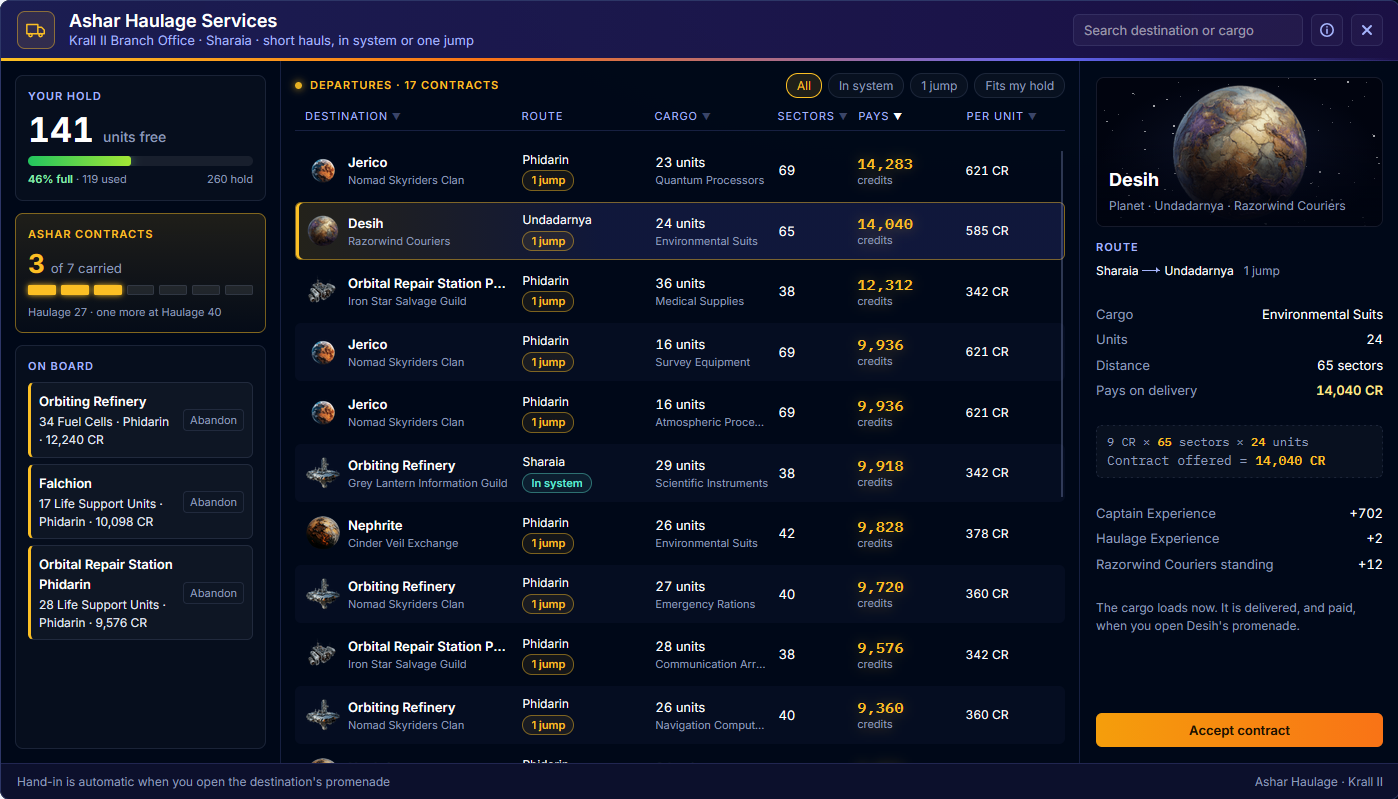
Ashar Haulage is now a departures board. Every column sorts, including the route, and each contract shows its destination, faction and jumps. Pick one and the manifest shows where it is going, how the pay is worked out, and the Experience and standing it earns.
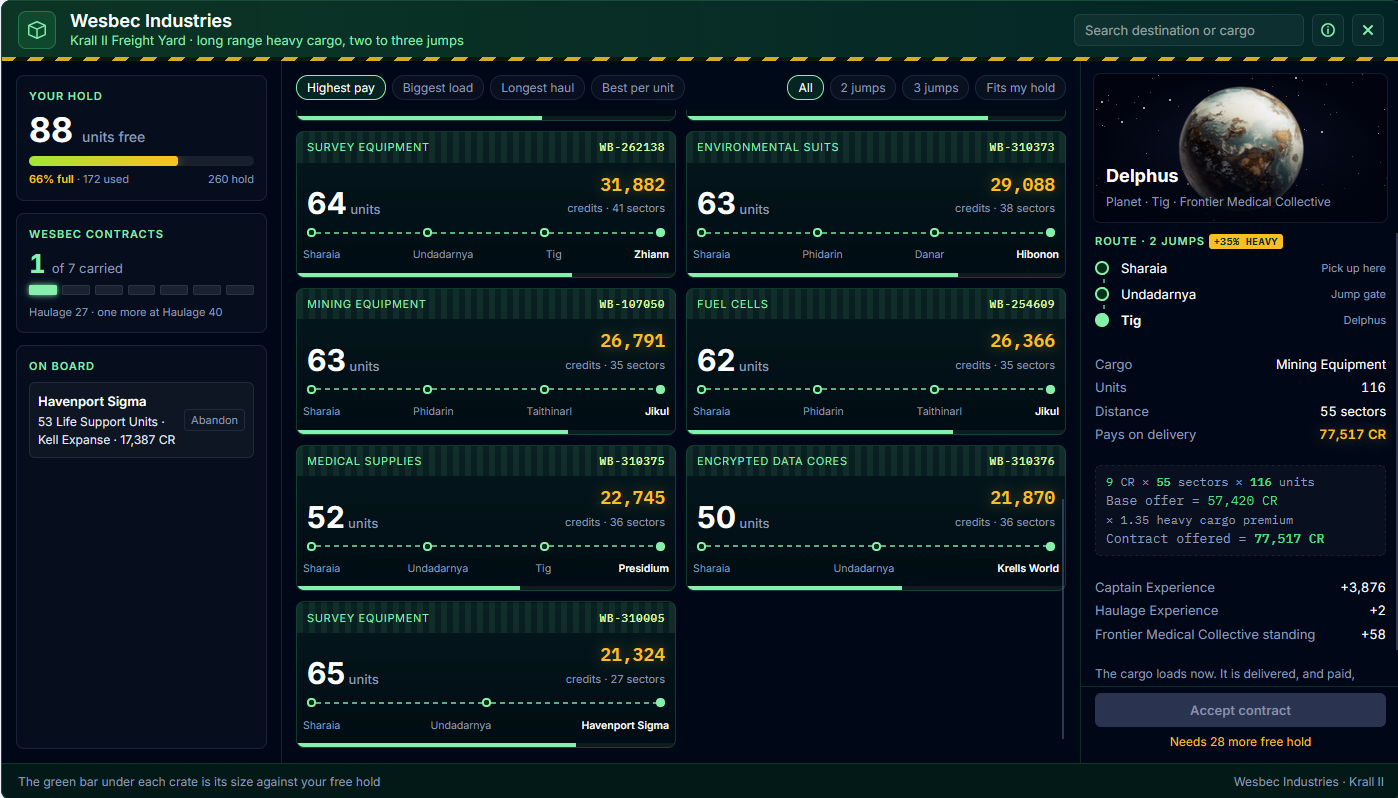
Wesbec Industries is a heavy freight yard of crates, each showing its full jump chain and its size against your free hold. Group them by system to plan a multi-drop run, and the manifest tells you how many more contracts go the same way.
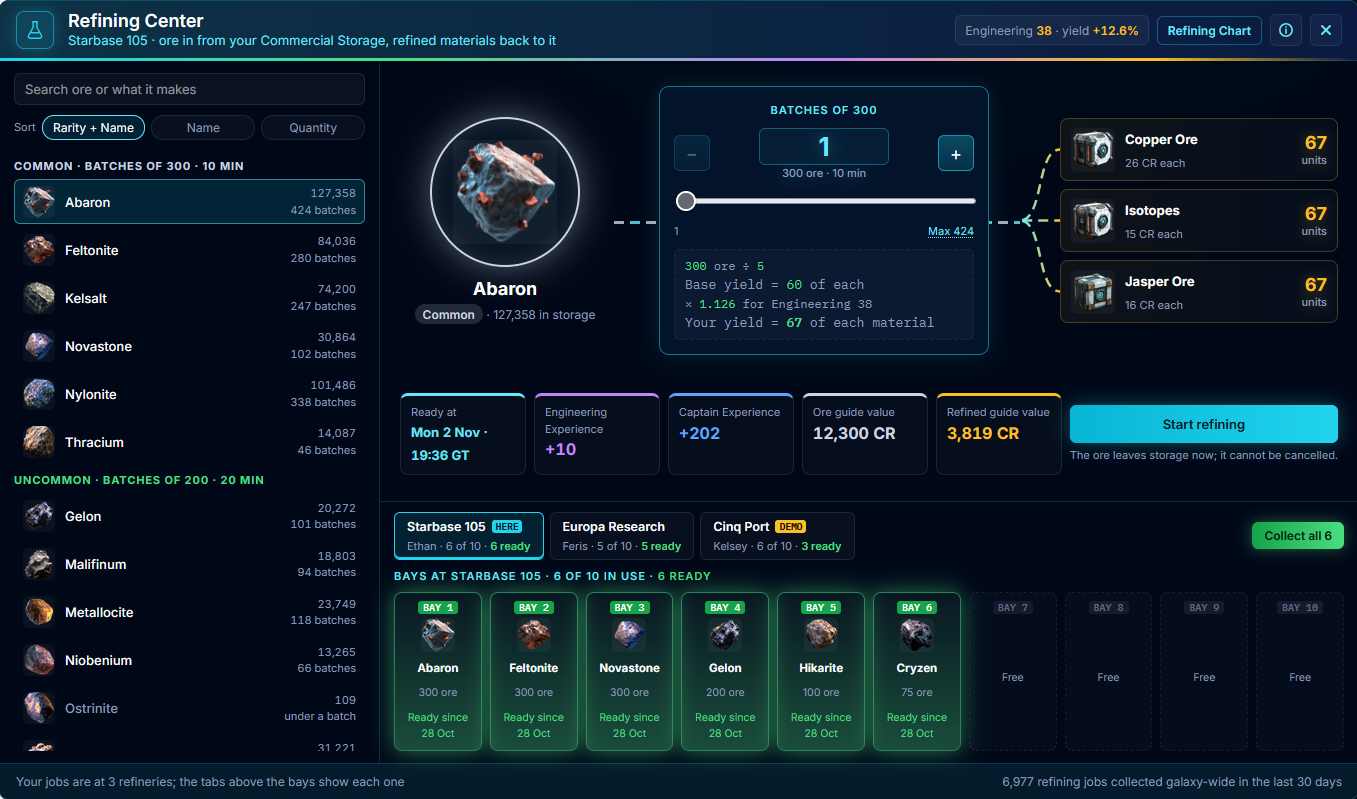
The Refining Center shows the process as a picture: your ore, the batches you choose and the three materials it becomes, with your exact yield worked out before you start. Type or paste a batch count, click Max to fill it, and each ore remembers the batch count you last used. Sort your ores by rarity, name or quantity, and see your jobs at every refinery from one screen.
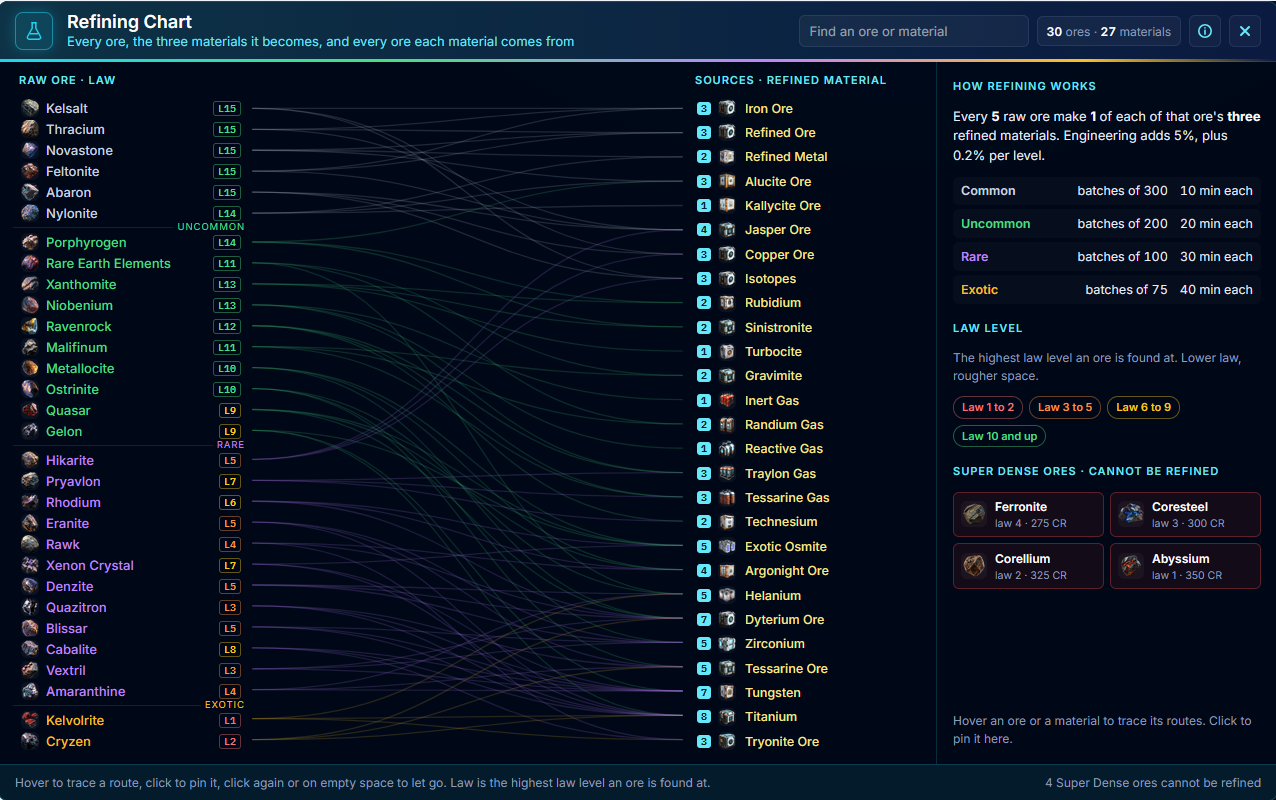
The Refining Chart is now one map of every ore and the materials it makes. Hover to trace a route, click to pin it, and see thirty days of real Exchange prices for each.
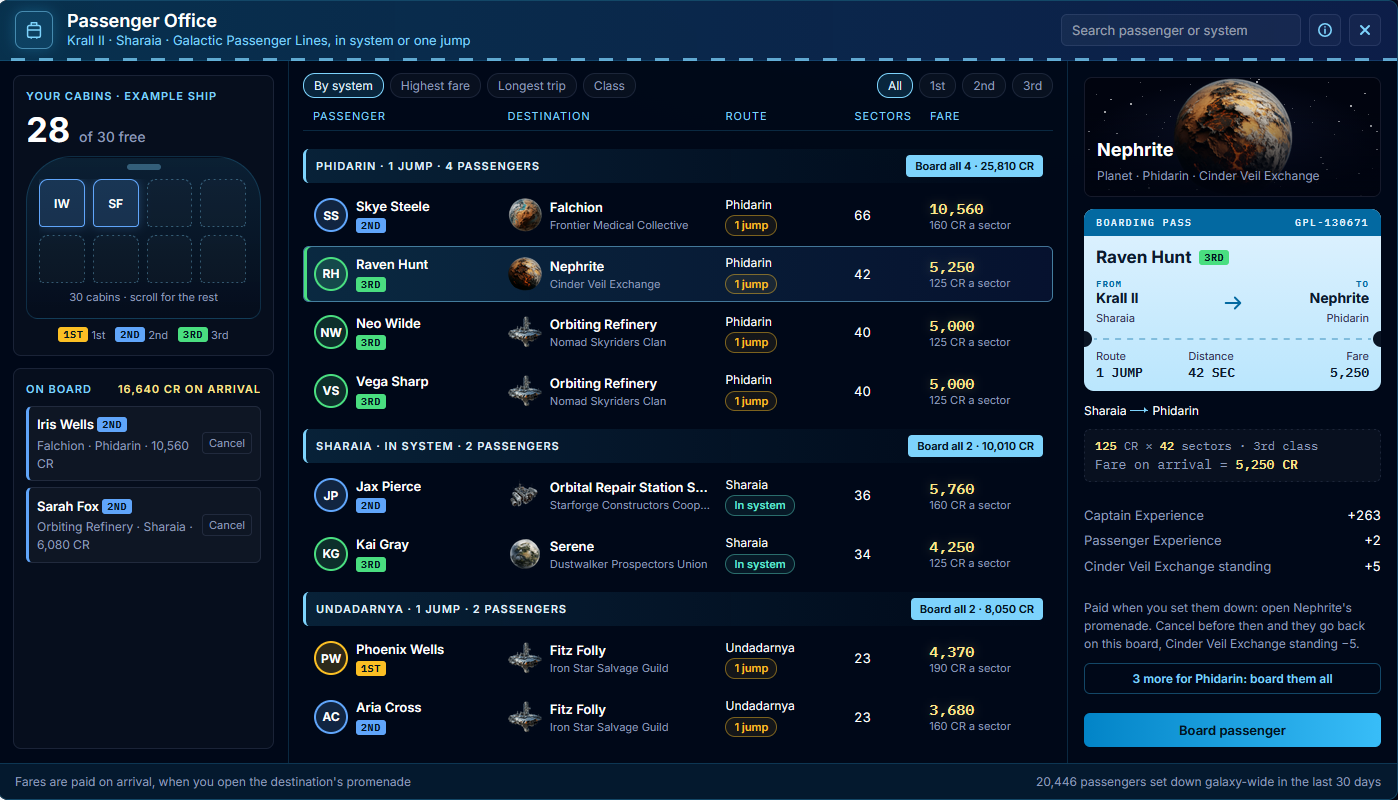
The Passenger Office is now a departure lounge. Your cabins are drawn as a seat map, passengers are grouped by the system they are heading for, and Board all fills your free cabins with the best fares going the same way. Each passenger has a boarding pass showing the fare working and what their arrival pays.
Thank you to Orge Snorrsen and Rioriel, whose testing shaped all of this.
🔧 Bug Fix
🔧 Clearer numbers on repair beams and energy
Shield Projectors and Armour Repairers on the Ship Load-out screen were showing their repair amount as “Damage”, which made them look like very weak guns, and their range was missing entirely. They now read Shield Repair or Armour Repair, along with the layer they mend, their repair rate, repair per second and range, exactly as the Item Database shows them.
In the Item Database, an item’s power cost was labelled “Energy/Use”, which suggested it drained power every time you fired. It never did. Energy is what an item draws from your reactors while it sits fitted, so the label now reads Energy Required, the same as everywhere else in the game.
🔧 Haulage and refining fixes
Abandoning a cargo delivery now closes exactly the contract you abandoned. Before, it could reopen an unrelated contract on a freight board, and when two of your deliveries looked alike it could close the wrong one.
Mission ores no longer appear in the Refining Center’s list, and they cannot be refined. They belong to the missions that asked for them. Wesbec Industries deliveries now have galaxy statistics of their own, instead of being added to Ashar Haulage’s totals.
🏴☠️ Fallen pirate bases stay for their salvage
A pirate base you bring down now stands as a hulk for its full 24 hours, counted from the moment it falls. Before this fix it could rot away within minutes, before you got back to salvage it. Thanks to Porrima and Barag for the report.
📖 Commodity descriptions tidied
Eleven commodities had descriptions that did not fit them. Four, including Entertainment Media and Construction Bots, were reading like mining lasers. They all now describe what the goods actually are. Thanks to Orge Snorrsen for spotting it.
✨ Improvement
🎁 Festive Pack shout outs now pay instantly
On a festive weekend, giving Coops a shout out in public chat now drops your Festive Pack the moment your message lands, instead of up to five minutes later. If you have already claimed that day’s pack, nothing happens, so there is no need to keep shouting.
The once a day reset now follows UK time all year round, turning over at midnight UK time whatever the season, and the announcement in chat now says so. Thanks to Captain Dirkish, whose question about a missing pack showed the old wording was catching out captains in other time zones.
🛠️ A brand new Ship Loadout
The Ship Loadout screen has been rebuilt from the ground up. Your ship now sits at the centre of the screen with every one of its slots laid out around it, each showing a picture of what is fitted, so your whole fit can be read at a glance. Empty slots are dashed and marked Open, and the strip above your ship lets you pick out one type of slot at a time.
Click any slot and the panel on the right tells you everything about that item: its key numbers in large tiles, its durability, how much of your ship’s power it draws, its serial number and its description. Missile racks keep their magazine right there, so you can load, change rounds or unload without leaving the screen. Anything worn or offline is flagged in amber or red before it lets you down.
Fitting works the way it always has. Click an open slot, choose from your Ship Inventory, and the item goes straight into the slot you picked. The list now warns you when an item is the wrong class for your hull before you try to fit it, rather than after.
The column on the left keeps every figure you rely on, from power and shields to armour, cargo, drone bandwidth and total DPS. And if you would like another of something you have fitted, the new Order another on the Exchange button opens its market straight from the loadout.
🎯 Bounty contacts grow with their level
A combat contact’s level now means bigger bounties and better pay. Level 1 still asks for 8 to 12 kills, level 2 now asks for 15 to 25, level 3 for 26 to 35, level 4 for 36 to 45 and level 5 for 46 to 55.
Each level above 1 also adds 20% to the credits and Experience paid per kill, so a level 2 contact pays 1,800 credits and 120 Experience per kill and a level 5 pays 2,700 credits and 180 Experience. The rate is shown in the mission text. Thanks to Dirkish for raising it.
🛡️ Shield regen hull bonus, explained
A hull’s Shield Regen bonus scales the shields you fit, and regen modules are not counted. That was always how it worked, but the wording never said so. The Hull traits pop up in the Dry Dock now says it plainly and shows the working for your own ship: your fitted shields’ regen, times the bonus, and what your modules add on top without it. The Shields panel labels the modules row the same way, so the two always agree. Thank you to Orge Snorrsen for asking.